Are you architecting your own replacement? Is AI going to ‘happen to you’?
Are you architecting your own replacement?

Marketing Technology tutorials, WordPress tips, tricks, techniques, plus advice for site builders, automations, programming and web development

Are you architecting your own replacement?

Here’s how smart financial services firms can win back significant time without adding even more stress or dangerously cutting corners
How you can use n8n, a visual “no-code” automation platform, to streamline your email management and connect it with tools like Google Sheets.
Getting customers through the door or to your website is exciting. Especially in the early days, chasing new interest feels like progress. But once you have got people’s attention, the real work begins.

When WordPress runs out of disk space, you have problems. Here’s how to diagnose your website, free up more space, and optimize your hosting.

When did you last check your WordPress hosting or clean up your database? Bloat in your site is a culprit for slowness and things breaking.
Should you create a logged in member area on your WordPress site? Do you run courses, stores, or communities on third-party platforms?
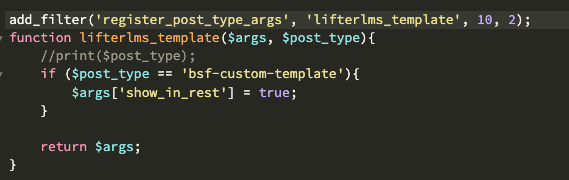
Just a quick code snippet for anyone who had the same issue as me, especially anyone using the Custom Course Templates for LifterLMS plugin.

Will a free membership area work better than a free newsletter for keeping subscribers engaged and active long term? Let’s find out …

Can ChatGPT Replace Developers? I hand-coded a WordPress plugin in PHP then asked the AI to try too for comparison. Here are my results.

Sell digital or physical products online using WooCommerce and WordPress with this step by step guide plus free downloadable worksheet.

When you are head down, doing your work, and getting things done, it is easy to lose track of the big picture or where you are headed before reality catches up with you.

Should your blog be the same website as your business pages? Maybe put your articles in a folder? Should you blog on a subdomain?

Changing my WordPress theme boosted my SEO. By a lot.

Had your Google search result hijacked? Here is how to tell if your website was hacked, and what to do to fix it!

The unfortunate truth is that most businesses don’t explode into flames or crash in one spectacular disaster. Instead, they sink quietly, bit by bit, while their owners convince themselves that everything is fine. By the time they realize there’s a problem, the lifeboats are already gone. If your company feels like it’s drifting, it’s time…

Online businesses have a lot of advantages, and not least because there is more advice out there freely available for purely digital businesses. I am as guilty as any marketing technology advisor so let me partially make up for that today! Angela asked if I could offer advice for automation and efficiency in a small…
UsefulTools is described as … … a web magazine for people who love web tools and apps. There are new and exciting applications being developed all the time. We sift through the abundance of technologies available to you, and help you find the most useful tools. Right away you might be thinking this puts them…
Knowing who and what your site is for is key.
Consider this site, there are lots of things I can and do talk about, but in most cases I try to bring it always back to the main themes of boosting your authority and business via new media.
Pictures of my cat are more likely to appear on my personal site. Photography stuff goes on my photography blog.
That is when segmentation comes in. This is where you get people to opt-in to a more focused site, list or feed, so that the rest of your audience are not bothered by it and where you can comfortably lavish the full package on just those people.
Sub-lists though are not the only way to do it. You can create off-shoot websites, as I did with Authority Blogger. These satellite sites can attract their own search traffic through creating highly targeted content and some kick-start links from your main site.
This traffic will also be funneled to join your niche email list or feed, and will not be distracted by your broader content outside of that silo because they will not get to see it unless you intentionally link it up.
Yes, creating new sites is additional work, but often a highly focused site does well both with audience and search, much more easily than a broad, cumbersome and disorganized monolithic site. A domain and ten pages of killer flagship content might be all you need.
Worth a try?
WordCamp UK 2008 was an interesting mixture of blogging (as you would expect) and developer conference. It was like two familiar worlds had collided. WordPress as CMS One of the development issues raised was the growing use of WordPress as a platform rather than as a blog. Many people are now looking to WordPress as…
What are visitors arriving at your site for? It’s a question worth asking because if you don’t know, how can you provide it? Search stats will tell you, as will some of the visitors if you ask. In general your readers have followed a scent, a trail that will lead them to their goal. What…
Bloggers like to give and win prizes. It offers some excitement for readers, content and links for the blogger, and if the prize is offered by a third party it gives them some exposure too. Darren does this a lot and to good effect, I do it very occasionally when I have something good to…
I’m a little embarrassed to tell you that I have been using the phrase “New Media” without ever thinking about the definition very much. You see, “New Media” is one of those things you know when you find it, but when it comes to explaining to someone else we can stumble. Let me try now…
Recall I found out about an automatic commenter-thanking plugin I was very excited about? It turns out that Dreamhost, my hosting company, were not quite as thrilled as I was. Hello, Please disable the plugin that is causing this query (otherwise I’ll have to disable your mysql table or user and I really don’t want…
One of the most common issues with blogs that I critique is the WWW/No-WWW issue. That is where you can see the same content with both the WWW. in the URL and without. Doesn’t seem like much of a problem? There is a theory around SEO circles that having content available on both creates problems…
Adam started a great thread over at the Authority Blogger Forum which I would like to open up over here; How many columns should a blog have, and why? For myself, I switch between 2 and 3 columns. When I have advertising, such as at DSLRBlog, I have a third column to accommodate it. That…
Every week I am asked how I put that download link in my RSS feed. Until to now I have had to explain that the solution requires a WordPress plugin that I hard coded. No longer! Damian, my WordPress hacking friend, has kindly released the plugin complete with an options screen. Now anyone can do…
My friend Damian and I have just been moving DSLRBlog from Drupal 5 to WordPress 2 using instructions from D’Arcy Norman. While Drupal is a fantastic platform, I had problems maintaining it. It was getting me down particularly fighting the torrent of spam being thrown at it. Keeping on top of updates, bug fixes, security…
Gary has written a post about his “Group Writing Project” WordPress plugin that should be interesting to anyone involved in Wordpress hacking and plugin development. Most interesting is his description of a poorly documented Wordpress function, wp_insert_post() that ought to be very useful. The most important thing about the plugin is the wp_insert_post() function that…
My good friend Damian has just released his first plugin and it’s a corker. It goes by the name WP_LinkIt and I think many bloggers will find it useful … WP_LinkIt as a free simple Wordpress plugin to automatically convert text from your posts and pages into links from your blogroll. This makes it easy…
I just majorly goofed on my blog. While upgrading a bunch of blogs to Wordpress 2.2 I overwrote my theme before checking my backup. It seems my FTP had not managed to transfer my sidebar so when I had a look at my handy work I had the default staring back at me. Don’t do…
The buy me a beer plugin is not the only plugin I have been trying out recently. Here are some other Wordpress plugins you might want to try out Dagon Design Sitemap Generator – sitemaps are not just useful for visitors but can help your posts get indexed also. This plugin makes creating a sitemap…
You might have noticed under my posts a little cup of coffee icon. I am trying out a plugin for Ankesh called “Buy Me a Beer Plugin” … This WordPress plugin allows your readers to donate money to you via PayPal. The plugin is widget enabled. So the idea is if a reader likes your…
In my last post I said blogs were an excellent content management system. A couple of people asked me to elaborate. What is a CMS and why are they a good thing? What is a CMS? A CMS (Content Management System) is simply a computer software package that makes it easy to create web pages….
Mark is asking When Will You Upgrade to Vista? To answer your question Mark, not any time soon. Microsoft hasn’t exactly completely lost me as a customer but neither have they done anything at all that makes me want to upgrade. I will elaborate but first here is what Mark has to say Is there…
Jeremy Zawodny has gotten his dislike of JavaScript Badges and Widgets off his chest With all the talk of how the web has “become writable” with advent of blogs and self-publishing tools, you’d think that we’d have a better way of getting third party content on to our sites. Given that an overwhelming number of…