Digital Safety: How to Keep Colleagues, Customers, and Your Business Safe (Online and Off)
My Dad spent most of his career keeping people safe, first in the Fire and Rescue service and later as a Health and Safety consultant. I guess that combined with my genetic anxiety fed into my desire to watch over the safety of the people around me.
Running a modern business means dealing with risks. Many go far beyond your physical workspace. Yes, you still need to make sure your work area safe. But digital threats are often as damaging, harder to spot, and faster to spread.
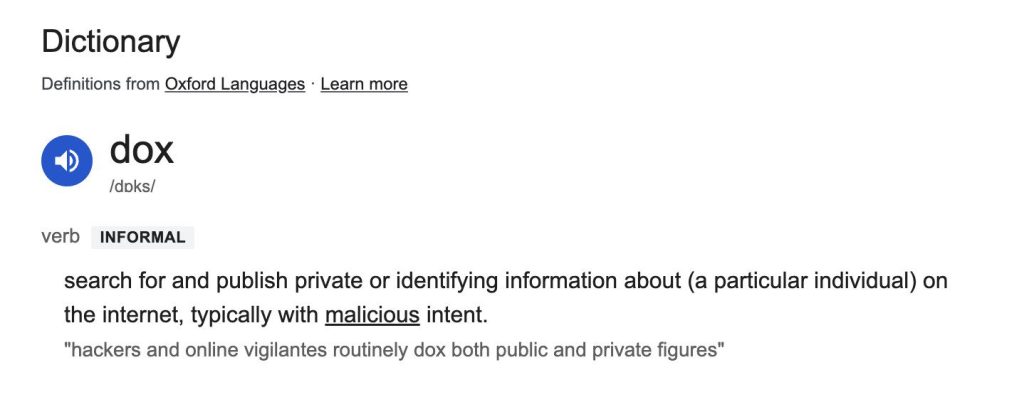
Digital can quickly lead to physical threats too. My friend had an angry person with mental health issues turn up at his home and threaten his family due to something someone else wrote about him along with some (at the time) loose privacy habits around what he shared online which made him easy to “dox”.
From phishing emails to stolen passwords to dodgy public Wi-Fi, small businesses are often an easy target. Not because we’re doing anything wrong, but because we don’t have the budget or backup that bigger companies rely on.
Every business should have what is called a “risk assessment”, and today that includes digital risks. You don’t need to write a formal report, just consider systems and procedures you use, where the weak points might be, and what would happen if something went wrong.
Things like:
- Who has access to what accounts
- Where customer data is stored and how
- How files are backed up
- What happens if someone clicks a bad link or loses a device
Knowing your realitic risks helps you mitigate them and avoid blind spots.
Take Digital Security Seriously (Especially if You’re Small)
Digital safety is essential. Every business, no matter how small, needs to make sure basic protections are in place. For example, an online AML course is fantastic for helping prevent financial crime against your business, a problem that seems to be growing for many businesses, both big and small.
- Use a password manager and never write down or reuse passwords across tools
- Turn on two-factor authentication (2FA) everywhere you can
- Use secure cloud or off-site storage instead of relying purely on local files
- Keep all apps, plugins, and devices up to date
- Avoid free public Wi-Fi and/or use a VPN when needed
If you work with contractors or freelancers, make sure they follow the same standards. One weak password can cause real problems that are a pain to clean up.
Be Transparent About Privacy
People are more aware than ever of how their data is handled. Build trust by being clear and responsible.
- Publish a privacy policy in plain English
- Only collect the data you actually need
- Use secure tools for contact forms, payments, and logins
- Communicate clearly if anything ever goes wrong
A privacy breach can damage your reputation overnight. Be open and proactive.
Talk to Your Family (They Might Be a Risk Without Realising It)
My father-in-law used to have a habit of oversharing until my wife shared her concerns.
He once offered for me to fix a strangers computer. Before he joined the Calgary Stampede corndog line he had never met this person. By the time they had done chatting this stranger knew more about us than our actual neighbours.
Well-meaning friends and family want to keep everyone updated, but that can put people you care about at risk professionally and personally.
If you run your business from home or share devices with family especially, it’s worth having a simple conversation about online safety and privacy. It’s not about scaring anyone, just explaining what matters.
As well as showing how to turn off location tracking in apps, and basic privacy hygiene (“Here is a photograph of our house which is empty while we are away at the Hilton Bon Voyage Hotel on 45th Street (room 12)!“, cover things like:
- Not installing apps or browser extensions without checking
- Never sharing business logins, even “just to help”
- Being cautious with text messages, photos, emails, attachments, and pop-ups
- Keeping work devices for work use only or at least super clean
- Why backups, client info, and passwords need to be protected and how
You don’t need to lock everything down. Just set boundaries so personal habits don’t accidentally put your business at risk.
Physical Security
Digital safety is crucial, but physical protections still matter. Especially if you have a workspace, valuable gear, or deal with customers.
- Use a post box or business address service to add a layer of protection for your physical address
- Lock devices when not in use so a password is needed to unlock them
- Use streaming cameras/CCTV and basic alarms
- Limit physical or visual access to sensitive areas or places where sensitive materials are kept
- Keep backups and paperwork stored securely with copies off-site
We don’t have the budget for “CCTV”, but it is still helpful to keeping yourself and guests safe from harm. Bigger businesses use something called crime center video management, so that any sketchy behaviour is picked up on promptly.
For our purposes a handful of internet connected streaming webcams was fine. I went with one that has good night capabilities for the external view. It was a couple of dollars per month for cloud storage and things like alerts, though I did have to tune the sensitivity way down!
Think of physical and digital security as two sides of the same coin, and weakness in one can make the other much more vulnerable.
Reporting, Not Blame
Things go wrong. Someone clicks a dodgy link, a phone gets lost, or login details are exposed. What matters is catching it early.
Make it easy to report issues by setting the tone:
- Mistakes happen – the important thing is fixing them quickly
- Reporting hazards and near-misses helps protect everyone
- Conversations should focus on learning, not punishment
This applies to your staff, your partners, and anyone who helps you run the business.
Bottom Line
Keeping your family and business safe isn’t about paranoia or perfection. It’s about forming habits that reduce risk, create clarity, and protect the people involved.
Talk to your team and family, and tighten up the areas that feel vulnerable. Use the tools that make sense for your size and stage.
It doesn’t have to be complicated just sensible and consistent. A few small changes now can prevent a big mess later.